
How to Apply as a Guide on Purposelee….

PURPOSELEE
How to Apply as a Guide on Purposelee
A clean website-blog version of the Purposelee Guide application journey.
Guide Onboarding Article | Blog-ready version | May 2026
Blog Introduction
This article explains how a prospective Guide can access the Purposelee platform, create or sign in to an account, apply as a Guide, verify the email address, and begin the Guide journey.
Before You Begin
- Use a stable internet connection and an updated web browser such as Chrome, Edge, or Safari.
- Keep an active email address ready because email verification is required.
- Choose a secure password and keep your Purposelee login credentials private.
- If you already have a Purposelee account, use the sign-in option instead of creating a duplicate account.
Step-by-Step Guide
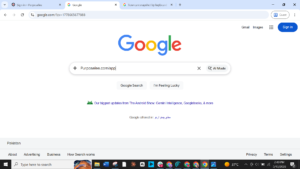
Step 1: Access the Purposelee App
Objective: Open the Purposelee application page from your browser.
What to do
- Open your browser.
- Type purposelee.com/app in the address bar or search for the Purposelee app page.
- Open the official Purposelee app page.
Figure 1. Access the Purposelee App
Step 2: Sign In or Create an Account
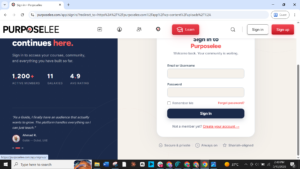
Objective: Choose the correct account path based on your current status.
What to do
- If you already have a Purposelee account, click Sign In and enter your credentials.
- If you are new to Purposelee, click Sign Up or Create your account.
Figure 2. Sign In or Create an Account
Step 3: Choose Apply as Guide
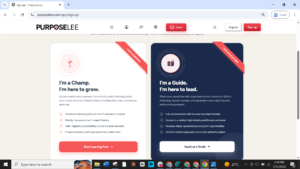
Objective: Select the Guide application pathway from the available options.
What to do
- Review the available account/application options.
- Click Apply as Guide to continue as a prospective Purposelee Guide.
Figure 3. Choose Apply as Guide
Step 4: Complete Guide Registration
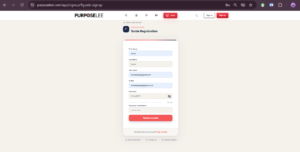
Objective: Provide the required registration information accurately.
What to do
- Enter your first name and last name.
- Enter your preferred username and active email address.
- Create a secure password and confirm it by typing it again.
- Click Register as Guide to submit your application details.
Figure 4. Complete Guide Registration
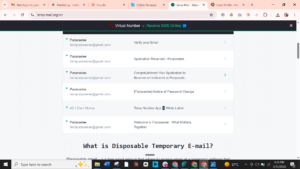
Step 5: Verify Your Email Address
Objective: Complete email confirmation to activate your Purposelee Guide journey.
What to do
- Open the inbox of the email address used during registration.
- Find the confirmation email from Purposelee.
- Click the confirmation or verification link inside the email.
- The link will redirect you to a Purposelee sign-in or verification page.
Figure 5. Verify Your Email Address
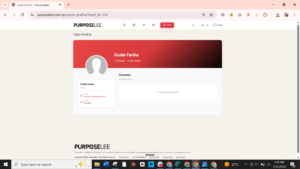
Step 6: Start Your Guide Journey
Objective: Access your Guide profile and begin preparing your course/content journey.
What to do
- Sign in to your Purposelee account.
- Open your Guide profile or dashboard.
- Begin preparing your course content as per Purposelee onboarding instructions.
Figure 6. Start Your Guide Journey
Final Checklist
☐ Purposelee app page opens successfully.
☐ Correct account path selected: Sign In or Sign Up.
☐ Apply as Guide option selected.
☐ Registration form completed with accurate details.
☐ Email verification completed.
☐ Guide profile/dashboard is accessible.
Purposelee | What Matters. Together.

Responses